
Chrome Proxy – ResiProx Proxy Integration Guide
- Introduction
- Prerequisites
- Step 1: Choose Your Residential Proxy
- Option 1: Using Proxies in Chrome Without Plugin (Not Recommended)
- Option 2: Proxy SwitchyOmega Plugin For Chrome
- Option 3: Proxy Switcher And Manager
- Option 4: Other Proxy Company’s Plugins
- What Is a Chrome Proxy Extension and Why Use One?
- Why Use Residential Proxies with Google Chrome?
- How to Verify Your Proxy Is Working in Chrome
- How to Set Up FoxyProxy in Google Chrome
- Discover the Best Chrome Proxy – Resiprox
- Latest News In 2026
- Frequently Asked Questions
- What makes residential proxies suitable for browser-based work compared to other options?
- How often should someone check their proxy connection after setting it up in Chrome?
- Can the same proxy work across multiple Chrome profiles at once?
- Why do some proxy connections feel slower than direct browsing in Chrome?
- What role does the proxy hostname play during Chrome configuration?
- Do Chrome updates in 2026 affect how proxies authenticate?
- Does a Chrome proxy extension change internet settings for other apps?
- Can FoxyProxy hold more than one ResiProx profile at the same time?
- What happens to open tabs when the FoxyProxy profile changes?
- Does Chrome keep using the proxy after the extension is disabled?
- Which protocol should a Chrome extension use with a username and password?
- Can one Chrome proxy profile send different websites through different proxies?
- Do Chrome proxy extensions work in Incognito?
- Why does a lookup page still show the home IP after the profile is saved?
- Can the same Chrome extension use residential and mobile endpoints?
- Will a Chrome proxy profile survive a browser restart?
- Conclusion
Introduction
Welcome to the Google Chrome proxy integration guide. This guide will walk you through the different ways to use proxies with the Google Chrome Browser. We will show you how to use proxies in Chrome without any plugins, as well as the top plugins to use proxies with.
Prerequisites
Before you begin, ensure you have the following:
- Google Chrome installed
- An active ResiProx account (HTTP or SOCKS proxies)
Step 1: Choose Your Residential Proxy
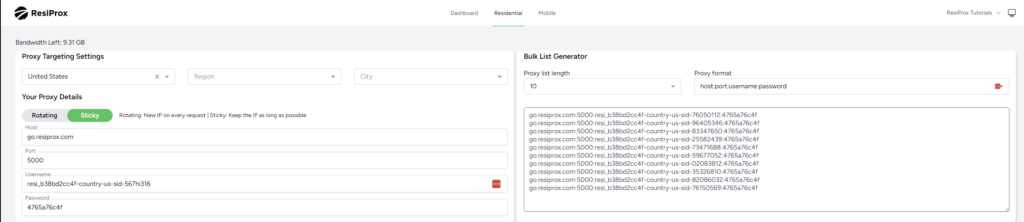
- In this example we will use a Rotating Residential Proxy with Sticky session from ResiProx
- Choose your Proxy Targeting Settings – You can filter proxies by Country, Region & City
Option 1: Using Proxies in Chrome Without Plugin (Not Recommended)
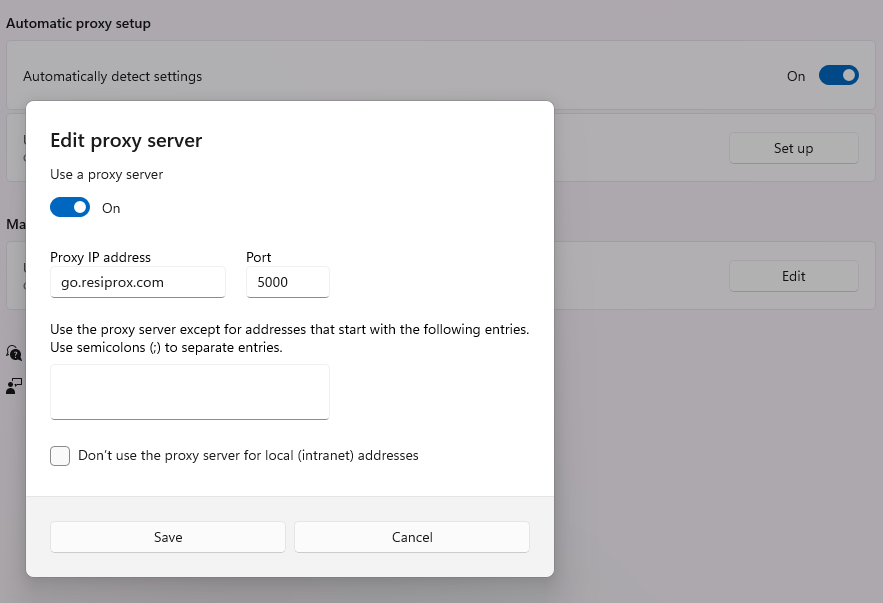
- Copy Paste This In Your Address Bar “chrome://settings/?search=proxy+settings”
- Click on Open Your Computer’s Proxy Settings
- Click on “Use a Proxy Server” & Enter the ResiProx Host & Port from your account
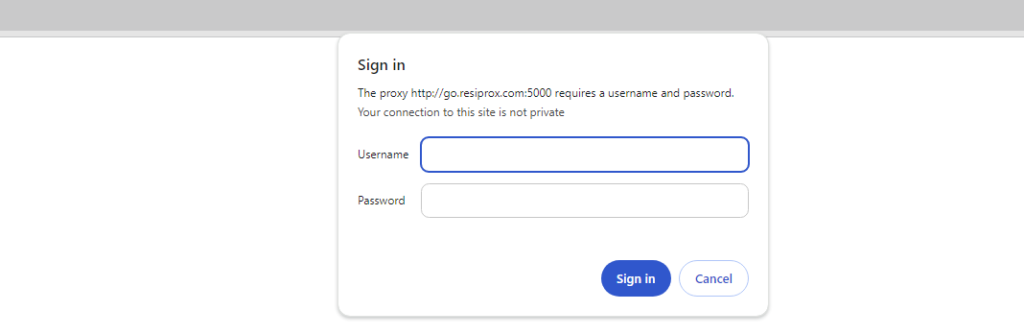
4. After you try to open a website you will see the following window, where you need to enter your proxy username and password that you generated in Step 1
Why is it not recommended to use proxies without a plugin? – When you put your proxy on your computer’s system settings ALL of your internet usage will go through the proxy, instead of just your Google Chrome usage, resulting in a lot more traffic being used due to automatic app updates, syncing and just general usage. It can also cause errors with some other softwares which do not support using proxies.
Option 2: Proxy SwitchyOmega Plugin For Chrome
- Download the Proxy SwitchyOmega Plugin
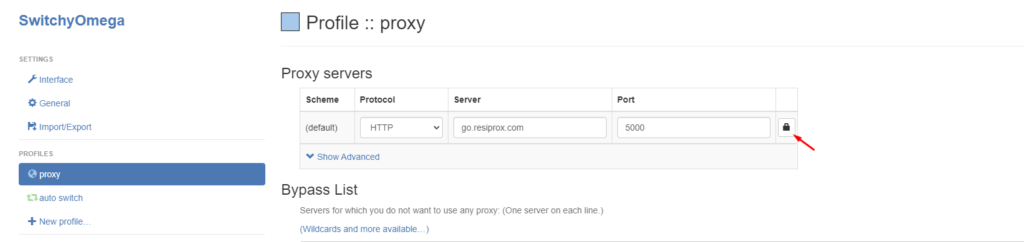
- Upon launching it, you will see that there is already a default proxy profile setup, enter ResiProx’s Host and Port on it, and then click the little Lock Icon in order to be able to write your Proxy Username and Password generated in Step 1
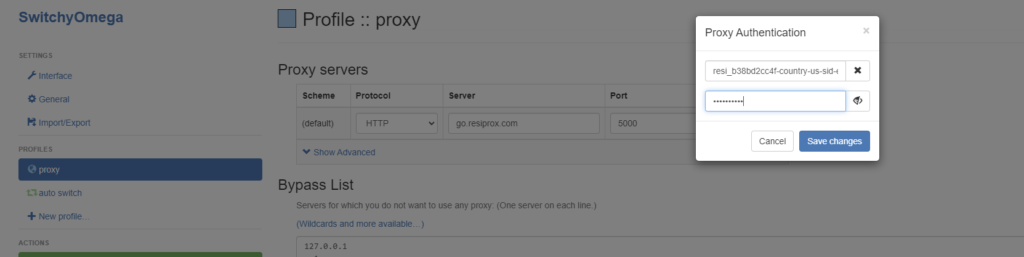
After you have clicked Save Changes, you also need to click on Apply Changes in the Bottom Left Corner
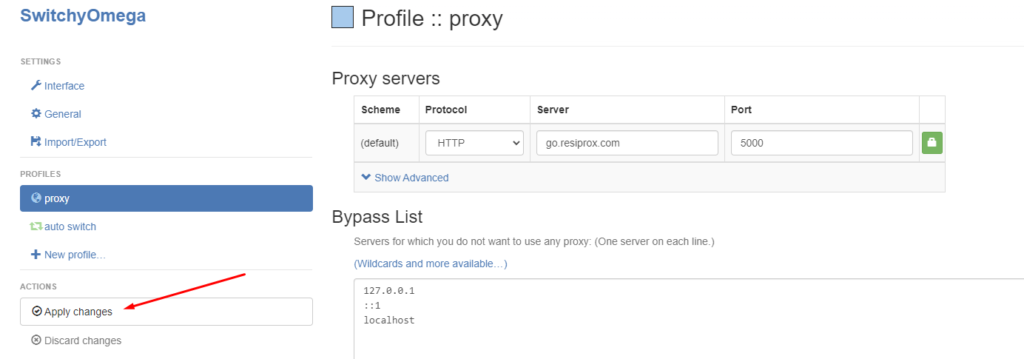
After all of this has been done, click on the Plugin Icon and switch from System Proxy to the “Proxy” profile you have edited just now and your proxy will work.
Keep in mind that due to limitations of Google Chrome & Proxy Manager Plugins for it, you can not use SOCKS5 connection protocol if your proxies require username and password authentication.
Option 3: Proxy Switcher And Manager
- Download the Proxy Switcher and Manager Extension
- Upon Launch you’ll be shown a quite extensive FAQ by their team, but you can also follow the steps below:
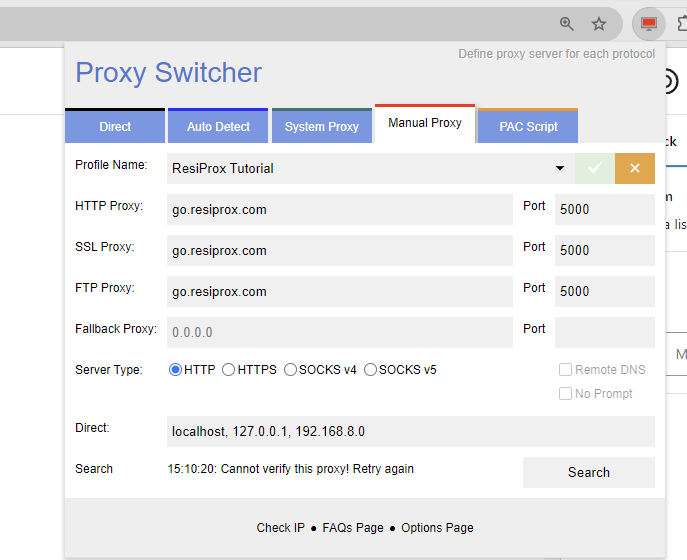
- Pick the Manual Proxy Option and enter ResiProx’s Host and Port
- When you try to open a page you will be shown a screen where you need to enter your proxy username and password, similar to how it would show up if using the proxies directly in Chrome
Option 4: Other Proxy Company’s Plugins
You can also consider using one of the plugins released by other proxy companies, they work quite well with proxies from any provider:
Keep in mind that you can not use SOCKS5 connection protocol on Chrome either with or without plugins if your proxies require user and password authentication.
What Is a Chrome Proxy Extension and Why Use One?
A Chrome proxy extension sits inside the browser and sends Chrome traffic through a proxy you choose. The rest of the computer stays on the normal network. That split is why many people pick an extension when residential proxies need to run only in the browser for ad verification, price monitoring, and market research.
System proxy settings apply to more than Chrome. App updates, sync tools, and other software can follow the same route. An extension keeps the change inside the browser window you are using. A proxy extension stores host, port, username, and password in a named profile. You turn that profile on or off from the toolbar. You can keep more than one profile and move between them without opening computer network menus.
Common reasons teams use an extension:
- Chrome is the only app that should use the proxy
- Several proxy profiles need to live side by side
- A sticky proxy vs rotating proxy choice changes during the day
- Work stays in the browser, while other programs keep the home connection
The extension still needs a real proxy behind it. The plugin only manages the connection. The IP itself comes from the provider. Mobile proxies fit the same extension flow when the session should look like carrier traffic instead of a home ISP.
Chrome extensions handle HTTP proxy,HTTPS proxy, andSOCKS5 proxy well when the proxy uses a username and password. Longer jobs that also need fingerprint control often move into tools. An extension does not replace a leak check. If the home address still appears, the profile is off, the details are wrong, or another Chrome path is leaking outside the proxy.
Why Use Residential Proxies with Google Chrome?
Many professionals turn to residential proxies when they work with browser sessions that need to reflect real home connections from specific areas. These proxies help present traffic in ways that align with ordinary user patterns during extended activities.
Residential proxies stand out because they draw from actual ISP networks rather than shared server environments. This quality supports tasks that benefit from stable presentation over longer periods. When consistency matters more than frequent changes, the residential approach often delivers better results for location-based testing with residential IPs.
Some users combine this setup with mobile proxies in situations that require simulating device-specific network conditions. Mobile proxies add another layer of variety for workflows involving app testing or mobile web experiences. The choice between types depends on whether the task needs fixed residential addresses or carrier-based connections that rotate more naturally.
In practice, residential proxies work well for ad verification and price monitoring projects. They also suit market research that requires viewing public web content from different regions without drawing attention to the connection source. The same applies to separate QA and monitoring workflows, where each session should maintain its own clear identity.
Longer browser sessions sometimes reveal small differences in how proxies handle authentication and data flow. Residential proxies tend to maintain smoother performance in these cases because their origin points match everyday consumer traffic more closely. This alignment reduces friction during research or testing that spans multiple sites or pages.
How to Verify Your Proxy Is Working in Chrome
Verification starts with a simple check that confirms the assigned address matches expectations. Open a new tab and visit a basic IP display page. The shown location and network details should reflect the proxy settings rather than the local connection.
A second step involves testing for leaks. Sites that check DNS or WebRTC information can reveal whether other data escapes the proxy tunnel. Consistent results across a few different test pages give a clearer picture of the overall proxy setup.
Key items to review during verification include:
- The country, region, or city that appears on the results page
- Whether the connection type matches the chosen protocol
- Any signs that the real local address still shows in background checks
Rotating residential proxies may return a new address on each test if the session has refreshed. Sticky sessions should hold the same details for the duration of the active period. Comparing results from two or three checks helps confirm which mode is active.
Mobile proxies follow the same verification process. The main difference appears in the network type listed on some advanced test tools. Both residential proxies and mobile proxies should show clean results when the configuration is correct.
If results vary between tests, small timing differences in how Chrome processes the connection can explain the change. Repeating the check after a short pause often clarifies whether the proxy is functioning as intended.
How to Set Up FoxyProxy in Google Chrome
FoxyProxy is a Chrome extension that stores proxy profiles and lets you switch them from the toolbar. Many people use it when they already have rotating residential proxies and want the browser to change routes without touching Windows or macOS network settings.
Add FoxyProxy to Chrome
- Open the Chrome Web Store and install FoxyProxy Standard.
- Pin the icon to the toolbar so the active profile stays visible.
- Open Options, then go to Proxies.
- Click Add.
Enter the ResiProx details
Give the profile a clear name, such as the country plus “sticky” or “rotating.” That label helps later when more than one endpoint is saved.
Fill in the fields from the ResiProx dashboard:
- Proxy type: HTTP
- Hostname: the proxy hostname shown in your account
- Port: the port paired with that hostname
- Username: the user string you generated
- Password: the matching password
HTTP is the practical choice in Chrome when the proxy uses username and password login. Save the profile after the fields are filled. The username string is where country, city, and session mode usually sit. A sticky window keeps one exit address for a stretch of pages. A rotating setup draws a fresh address more often.
Turn the profile on
Click the FoxyProxy icon. Switch from disabled to the profile you just saved. Open a new tab. A lookup on the IP address lookup page should show the proxy address, not the home network.
Useful habits after the first save:
- Keep one profile per location or session style
- Leave unused profiles off so Chrome does not mix routes
- Recheck the IP after Chrome restarts
- Use a separate profile for 4G / 5G mobile proxies when the task needs a carrier IP
FoxyProxy only routes Chrome. Phone traffic is separate. The how to use a proxy in mobile guide covers Android and iOS when the same credentials need to run on a device instead of a desktop browser. Firefox can store FoxyProxy profiles too, with a slightly different options layout. The Firefox proxy integration page walks through that browser. For work that needs SOCKS5 login plus a unique fingerprint, anti-detect setups such as the BitBrowser proxy and GoLogin proxy guides keep the proxy inside an isolated profile.
Discover the Best Chrome Proxy – Resiprox
Resiprox Premium Proxies – Unlock the Web with Power and Precision
Introducing Resiprox, the ultimate proxy solution designed to supercharge your online operations. With our Residential Proxies and Mobile Proxies, you get unmatched access to web data at scale, robust security, and seamless connectivity all backed by a free trial to experience the difference firsthand.
Product Features
- Rotating Residential Proxies: Harness the power of 10M+ ethically-sourced IPs across 180+ countries. These proxies rotate dynamically to support large-scale public data collection, market research, and workflows that benefit from automatic IP rotation, delivering 99.9% uptime and precise targeting at the country, city, or ZIP code level.
- Rotating Mobile Proxies: Powered by 4G/LTE/5G networks, our mobile proxies offer lightning-fast speeds with <0.3s response times and a 99.9% success rate perfect for real-time applications.
- Global IP Network: Tap into millions of IPs, including 3.5M+ in the US, 1.8M+ in Brazil, 3.1M+ in India, and more, ensuring coverage wherever you need it.
- Advanced Capabilities: Enjoy HTTPS proxy & SOCKS5 proxy support, unlimited concurrent sessions, and flexible rotating or sticky sessions, all wrapped in premium IP quality.
Product Specifications:
- Performance: High-speed browsing with 99.9% uptime and 24/7 expert support.
- Integration: Seamlessly works with Node.js, Python, PHP, Selenium, and more, featuring a dynamic endpoint generator and robust API access.
What It’s Built For:
Resiprox proxies are your all-in-one tool for:
- Public Data Collection: Collect public web data for approved business use cases, market research, and growth insights.
- Price Monitoring: Track prices across regions in real-time.
- Multi-Account Workflows: Run separate QA, monitoring, and research workflows across multiple accounts.
- SEO & Ad Verification: Monitor rankings and verify ads globally.
- Cybersecurity: Protect your brand and test applications securely.
- Specialized Tasks: From high-volume monitoring of limited-release products to travel fare aggregation, Resiprox delivers.
Why Resiprox Stands Out:
This isn’t just a proxy, it’s a game-changer. With comprehensive documentation, multi-platform compatibility, and a team of experts available 24/7, Resiprox ensures your projects run smoothly. Whether you’re a business scaling operations, a researcher gathering data, or a developer testing apps, our proxies adapt to your needs with precision and reliability.
Resiprox Premium Proxies – Your Key to a Smarter, Faster, and More Connected Online World.
Click here to discover our :
Latest News In 2026
Chrome’s extension platform in 2026 favors Manifest V3 tools. Older proxy managers built on the previous format stall, vanish from the store, or fail to apply a profile after an update. ZeroOmega is the maintained path for people who used SwitchyOmega-style profiles. FoxyProxy remains a common choice for named profiles and simple on/off switching.
Proxy login inside Chrome is still tied to how the extension passes username and password. HTTP profiles stay the everyday option for browser-only work. Services that hold a session on one residential IP for a set window pair cleanly with these extensions, which is why location-based testing with residential IPs still happens inside Chrome for shorter research tasks.
More teams now keep Chrome for quick checks and move longer sessions into anti-detect browsers. Those tools accept the same host, port, and login used in an extension, and they add a separate fingerprint per profile. The Dolphin Anty proxy and MoreLogin proxy guides show that pattern.
Mobile proxies vs residential proxies is a sharper split in 2026 browser work. Home ISP addresses stay common for public web reviews and price monitoring. Carrier IPs from mobile proxies show up more in app-style checks and device network tests. Both types can sit in the same Chrome extension as separate profiles.
Leak paths have not disappeared. WebRTC and DNS can still show the home network after a proxy profile looks active. A second check on a different lookup page, plus a fresh tab, is still the clean way to confirm Chrome is using the intended exit IP from the proxy locations you selected. Scripts and backend jobs are leaving the browser more often. When the same credentials feed a Python client, the HTTPX proxies guide covers that route so Chrome is not the only place the proxy runs.
Frequently Asked Questions
What makes residential proxies suitable for browser-based work compared to other options?
Residential proxies connect through real home networks, which helps them maintain better compatibility with how modern browsers like Chrome handle cookies, storage, and session data over time. This type of infrastructure often supports more consistent behavior during activities that involve multiple page interactions or form submissions. In contrast, other proxy categories may introduce patterns that browsers flag more readily in certain configurations. Many proxy integrations benefit from pairing residential proxies with precise location targeting options available through dedicated services.
How often should someone check their proxy connection after setting it up in Chrome?
Regular checks help catch shifts caused by network changes or session expiration on the provider side. Over longer periods, factors like local internet stability or browser cache buildup can influence how reliably the proxy continues to route traffic. Testing at different times of day sometimes reveals variations tied to overall network load. Tools that display current connection details, such as those found on IP lookup resources, make these ongoing assessments straightforward.
Can the same proxy work across multiple Chrome profiles at once?
Chrome profiles operate as separate environments with their own cached data and settings. A single proxy configuration can apply to one profile while another runs independently or uses different details. This separation allows different activities to proceed without sharing the same connection state. It becomes particularly relevant when managing several distinct research or testing environments at the same time.
Why do some proxy connections feel slower than direct browsing in Chrome?
Every proxy adds an extra routing step between the browser and the destination server. The physical distance to the proxy server and the encryption layers involved in secure connections contribute to this added time. Residential proxies sometimes show different latency profiles because they travel through consumer-grade networks rather than optimized backbone routes. Understanding these factors helps set realistic expectations for page load speeds during extended use.
What role does the proxy hostname play during Chrome configuration?
The hostname serves as the primary identifier that Chrome uses to locate and connect with the proxy server infrastructure. Accurate hostname entry ensures traffic reaches the correct gateway before any authentication or routing rules apply. Some providers offer dynamic hostname systems that adjust based on selected parameters like country or session type. Proper handling of this element reduces connection failures that stem from basic addressing issues.
Do Chrome updates in 2026 affect how proxies authenticate?
Browser updates frequently modify internal security protocols and extension handling mechanisms. These modifications can change how authentication credentials are passed or stored during proxy sessions. Staying aware of compatibility adjustments helps maintain smooth operation after new releases roll out. Residential proxy services generally adapt their endpoints to align with evolving browser standards over time.
Does a Chrome proxy extension change internet settings for other apps?
No. A Chrome extension only routes pages, tabs, and requests that Chrome itself makes. Desktop mail, file sync, and game clients keep the computer’s default path unless a separate OS-level proxy is also set. That is why an extension is a poor match when every app on the machine needs the same exit IP, and a better match when only browser checks need residential proxies. Another browser on the same PC, including Firefox, has its own proxy controls and will not inherit the Chrome plugin state. The Firefox proxy integration path is independent even when the hostname and password are the same.
Can FoxyProxy hold more than one ResiProx profile at the same time?
Yes. Each profile is just a saved set of host, port, and login values, so one extension can store a sticky research profile next to a rotating review profile. The username string is usually what separates those modes, along with the country or city baked into that string. Only one profile should be live in a given Chrome window, because two active routes in the same session mix cookies and cache. Naming profiles by task, such as “US sticky QA” versus “DE rotating watch,” keeps sticky proxies and rotating endpoints easy to tell apart later.
What happens to open tabs when the FoxyProxy profile changes?
Requests that fire after the switch follow the new profile. Pages that already finished loading can still show the old IP, old cookies, or an old WebRTC path until they reload. Forms and shopping flows that expect one network identity during the visit are safer in a fresh tab after the change. If the job needs the same address across several pages, a sticky window from the sticky proxy vs rotating proxy options is a better fit than flipping profiles mid-task. A quick IP address lookup in the new tab confirms which exit address that window is using now.
Does Chrome keep using the proxy after the extension is disabled?
No. Disabling the extension, setting it to off, or removing its toolbar control returns Chrome to the direct connection. The saved profiles stay inside the extension data, so they are not deleted; they are simply unused. A managed work laptop can still apply a company proxy through system policy even when the plugin is off, which is a different layer from FoxyProxy. If a lookup still shows a non-home address after the plugin is off, the leftover route is usually an OS proxy or another extension, not the disabled FoxyProxy profile.
Which protocol should a Chrome extension use with a username and password?
HTTP is the protocol that matches how Chrome extensions pass a username and password today. The same ResiProx account can still expose SOCKS5 for apps and anti-detect browsers that accept that login style outside a normal Chrome plugin. Mixing protocols in one profile is a common source of failed connects, because the host and port pair is tied to the protocol you picked. When the work leaves Chrome and goes into a script, the HTTPX proxy setup can use the protocol that client supports. For isolated browser profiles that need SOCKS5 plus a separate fingerprint, the BitBrowser proxy flow is built for that combination.
Can one Chrome proxy profile send different websites through different proxies?
A basic profile sends every Chrome request through one endpoint. Rule-based modes, when the extension offers them, can match a hostname pattern to a different saved proxy so one site uses one exit and the rest of the web uses another. That is useful when a review task only needs a local IP on a short list of public pages. Rules still share the same Chrome cookie jar unless you also split Chrome user profiles. For stronger isolation per site or per workflow, anti-detect tools in the integrations section give each identity its own proxy and storage.
Do Chrome proxy extensions work in Incognito?
They work in Incognito only after Chrome is allowed to run that extension in private windows. If that permission is off, the Incognito window uses the direct connection even while the normal window stays on a proxy profile. Incognito also starts with a clean cookie set, so a logged-in session from the main window does not carry over. That split is handy for a one-off public page check, but it is not a full substitute for a separate fingerprint. Longer isolated work still fits browsers described in the GoLogin proxy and Dolphin Anty proxy guides.
Why does a lookup page still show the home IP after the profile is saved?
A saved profile is not the same as an active profile. Chrome can also keep an old result in a tab that loaded before the switch. WebRTC and DNS can still expose the home network while the main page request goes through the proxy, which is why a second check on what is my IP in a new tab is more reliable than one cached result. A system proxy, a second extension, or an IPv6 path can sit beside FoxyProxy and confuse the reading. Wrong host or port values fail quietly on some sites and fall back to the direct path instead of showing a hard error.
Can the same Chrome extension use residential and mobile endpoints?
Yes. The extension does not care whether the exit IP comes from a home ISP or a carrier. What changes is the network type shown on lookup tools and how the session behaves on sites that treat phone traffic differently from desktop traffic. A residential proxies profile is the usual choice for desktop-style public web reviews. A mobile proxies profile is the usual choice when the check should look like 4G or 5G. The mobile proxies vs residential proxies comparison is the place that difference is spelled out, including when each type is the better fit.
Will a Chrome proxy profile survive a browser restart?
The stored host, port, and login stay on disk with the extension, so you do not retype them after Chrome closes. Whether the profile turns itself back on depends on that extension’s reconnect option and on whether Chrome was shut down cleanly. A Chrome update can reset extension permissions and leave the toolbar looking connected while traffic is direct again. After a restart, a fresh tab and a lookup against the proxy locations you expect is the simple confirmation. If the same credentials also run in MoreLogin proxy profiles, those sessions are stored in that app and are not tied to the Chrome restart at all.
Conclusion
We’ve shown you all the different ways to use proxies in the Google Chrome Browser. However for best results it is recommended to use an anti-detect browser instead, because they handle proxies & fingerprint protection much better than a simple Chrome plugin. You can also use SOCKS5 with user&password authentication proxies with anti-detect browsers.