
Welcome to the Adspower proxy integration guide. This guide will walk you through the steps required to configure and integrate proxies with Adspower Anti-detect browser. Whether you are using proxies for enhanced privacy, to bypass geographical restrictions, or for web scraping, this guide will help you get set up quickly.
Unlock Adspower’s full potential with Resiprox residential proxies — start your free trial now!
- Prerequisites
- Step 1: Choose Your Residential Proxy
- Step 2: Open Adspower & Create a New Profile
- Step 3: Choose Proxy Type
- Step 4: Test the Proxy Connection
- Step 5: Troubleshooting
- Step 6: Additional Settings (Optional)
- Best Residential Proxy in 2026 – ResiProx
- Common Use Cases for Adspower with Residential Proxies
- Best Practices for Managing Multiple Adspower Profiles with Proxies
- FAQ
Prerequisites
Before you begin, ensure you have the following:
- An active AdsPower account (they have a free trial available)
- An active ResiProx account (HTTP or SOCKS proxies)
Step 1: Choose Your Residential Proxy
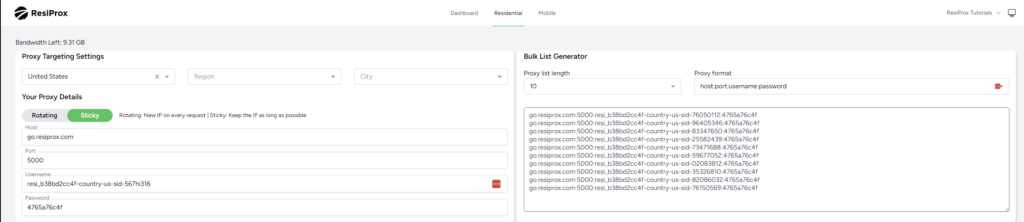
- In this example we will use a Rotating Residential Proxy with Sticky session from ResiProx
- Choose your Proxy Targeting Settings – You can filter proxies by Country, Region & City
Step 2: Open Adspower & Create a New Profile
- Log in to your AdsPower account.
- Create a New Profile.
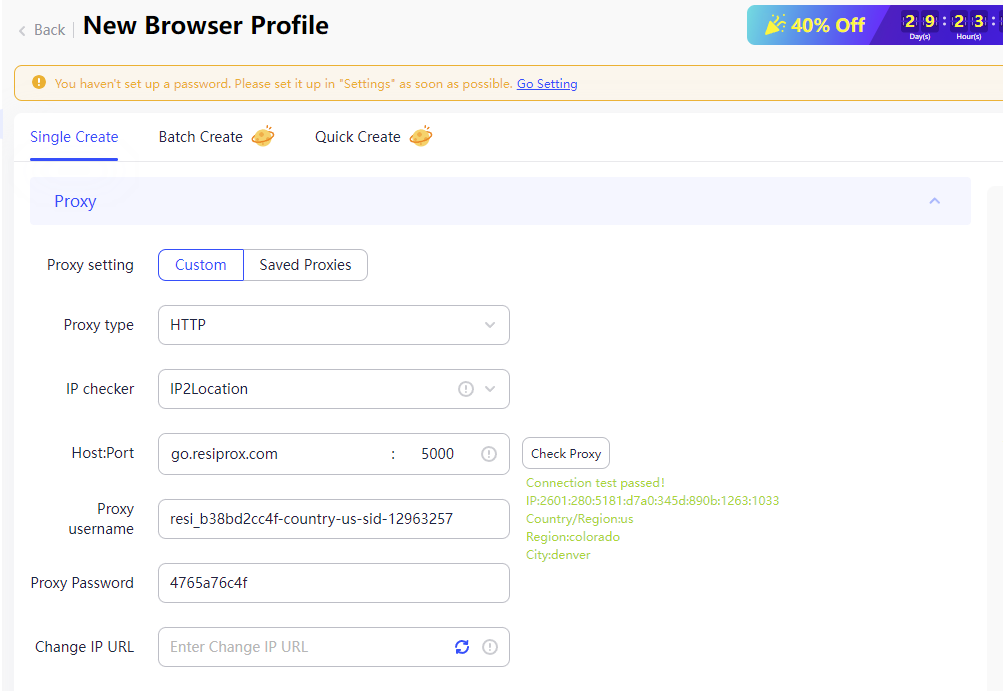
- Find the Proxy settings section.
Step 3: Choose Proxy Type
- Select the proxy protocol you want to use, HTTP or SOCKS, ResiProx supports both connection protocols.
- Enter the proxy server details:
- Proxy Server Address: go.resiprox.com
- Port: 5000
- Username and Password: Enter your proxy details from Step 1
Step 4: Test the Proxy Connection
- Click the Check Proxy Button
Step 5: Troubleshooting
If you encounter issues with the proxy integration, consider the following:
- Check Proxy Details: Ensure the proxy server address, port, and authentication details are correct.
- Firewall/Antivirus/VPN Settings: Ensure your firewall, VPN or antivirus software isn’t blocking the connection.
- Proxy Service Status: Verify that your proxy service is active and functioning correctly.
Step 6: Additional Settings (Optional)
- Sticky Sessions or New IP on every request: Decide if you want to keep the same IP for as long as possible(Sticky Session) or if you want a new IP on every request.
- Geolocation Settings: Configure the proxy to use specific geolocations if your software or use case requires it.
Best Residential Proxy in 2026 – ResiProx
Resiprox Premium Proxies – Unlock the Web with Power and Precision
Introducing Resiprox, the ultimate proxy solution designed to supercharge your online operations. With our Residential Proxies and Mobile Proxies, you get unmatched access to web data at scale, robust security, and seamless connectivity all backed by a free trial to experience the difference firsthand.
Product Features
- Rotating Residential Proxies: Harness the power of 10M+ ethically-sourced IPs across 180+ countries. These proxies rotate dynamically to bypass IP blocks, CAPTCHAs and delivering 99.9% uptime and precise targeting at the country, city, or ZIP code level.
- Rotating Mobile Proxies: Powered by 4G/LTE/5G networks, our mobile proxies offer lightning-fast speeds with <0.3s response times and a 99.9% success rate perfect for real-time applications.
- Global IP Network: Tap into millions of IPs, including 3.5M+ in the US, 1.8M+ in Brazil, 3.1M+ in India, and more, ensuring coverage wherever you need it.
- Advanced Capabilities: Enjoy HTTPS & SOCKS5 support, unlimited concurrent sessions, and flexible rotating or sticky sessions, all wrapped in premium IP quality.
Product Specifications:
- Performance: High-speed browsing with 99.9% uptime and 24/7 expert support.
- Integration: Seamlessly works with Node.js, Python, PHP, Selenium, and more, featuring a dynamic endpoint generator and robust API access.
What It’s Built For:
Resiprox proxies are your all-in-one tool for:
- Web Scraping: Extract public data effortlessly for insights and growth.
- Price Monitoring: Track prices across regions in real-time.
- Multi-Accounting: Manage multiple accounts without limits.
- SEO & Ad Verification: Monitor rankings and verify ads globally.
- Cybersecurity: Protect your brand and test applications securely.
- Specialized Tasks: From sneaker botting to travel fare aggregation, Resiprox delivers.
Why Resiprox Stands Out:
This isn’t just a proxy, it’s a game-changer. With comprehensive documentation, multi-platform compatibility, and a team of experts available 24/7, Resiprox ensures your projects run smoothly. Whether you’re a business scaling operations, a researcher gathering data, or a developer testing apps, our proxies adapt to your needs with precision and reliability.
Resiprox Premium Proxies – Your Key to a Smarter, Faster, and More Connected Online World.
Click here to discover our :
–Rotating Residential Proxies
Learn More at Resiprox.com
Common Use Cases for Adspower with Residential Proxies
Adspower combined with residential proxies provides powerful solutions for various online activities. Multi-account management is one of the most popular use cases, allowing businesses to operate multiple social media profiles, e-commerce accounts, or advertising accounts without triggering platform security systems. Each browser profile maintains complete isolation with its own IP address, cookies, and fingerprint.
E-commerce sellers frequently use Adspower with residential proxies for Amazon to manage multiple seller accounts from a single dashboard. This setup prevents account linking and reduces the risk of suspensions. Social media marketers also benefit by running separate Instagram, Facebook, or Twitter accounts for different clients or campaigns while maintaining authentic residential IP addresses that platforms trust.
Web scraping and data collection operations achieve higher success rates when using Adspower with rotating residential proxies. The combination of browser fingerprint protection and legitimate residential IPs helps avoid detection and IP blocks. Affiliate marketers use this setup to test campaigns across different geolocations and manage multiple affiliate accounts safely without cross-contamination.
Best Practices for Managing Multiple Adspower Profiles with Proxies
Assign one unique residential proxy to each browser profile for complete IP isolation. This prevents any connection between accounts and ensures that activity on one profile never impacts another. Using the same proxy across multiple profiles increases the risk of account linking and potential bans, especially on platforms with strict multi-account policies. reddit
Configure proxy rotation settings based on your specific use case. For sensitive accounts requiring logins like social media management or e-commerce, use sticky session proxies that maintain the same IP for extended periods. This creates natural browsing patterns that platforms recognize as legitimate. For web scraping or data collection tasks, enable IP rotation on each request to avoid rate limiting and blocks.
Keep backup proxy configurations and regularly test your connections using the Check Proxy feature. Store alternative residential or mobile proxy details for quick replacement if a proxy fails or gets blocked. Monitor proxy performance using external testing tools to verify that your IP location and anonymity settings match your requirements before launching important tasks.
FAQ
What is the best proxy type for Adspower in 2026?
Residential proxies are the best choice for Adspower in 2026, especially for managing sensitive accounts on social media, e-commerce, or advertising platforms. These proxies come from real ISPs and appear far more legitimate than datacenter IPs, resulting in higher success rates and fewer bans. For the connection protocol, SOCKS5 proxies offer the most flexibility and better privacy, while HTTP/HTTPS proxies work well for standard web browsing and account management tasks. Choose sticky session residential proxies for maintaining consistent IPs on platforms that monitor login patterns.
How many Adspower profiles can I run with one residential proxy?
You should assign one unique proxy to each Adspower profile for maximum security and isolation. Using the same proxy across multiple profiles defeats the purpose of anti-detect browsing and increases the risk of account linking. However, you can use proxy rotation with a single mobile proxy IP that rotates between profile switches, which saves costs while maintaining IP quality. For bulk operations or less sensitive tasks, some users share proxies across 2-3 profiles, but this approach increases detection risk and is not recommended for high-value accounts.
How do I fix proxy connection errors in Adspower?
Start by verifying your proxy details are entered correctly including IP address, port, username, and password. Test the proxy connection outside of Adspower using online tools to confirm it’s working properly. Check that your firewall, antivirus, or VPN isn’t blocking the connection by temporarily disabling them or adding Adspower to your exception list. Ensure you’ve selected the correct proxy protocol (HTTP, HTTPS, or SOCKS5) that matches your proxy service. If problems persist, try switching proxy protocols or contact your proxy provider for support.
Can I use free proxies with Adspower?
While Adspower technically supports free proxies, they are not recommended for any serious use cases. Free proxies suffer from slow speeds, frequent downtime, and poor security that can compromise your accounts and data. They are often shared by thousands of users, leading to IP blocks and blacklisting on most platforms. For managing valuable accounts or running business operations, invest in quality residential proxies or mobile proxies from reputable providers like ResiProx. The cost of premium proxies is minimal compared to the risk of losing accounts or experiencing constant connection failures with free alternatives.