
Contents10 sections
  1. Morelogin Proxy – ResiProx Proxy Integration Guide
  2. Introduction
  3. Prerequisites
  4. Step 1: Choose Your Residential Proxy
  5. Step 2: Open MoreLogin & Create a New Profile
  6. Step 3: Choose Proxy Type
  7. Step 4: Test the Proxy Connection
  8. Step 5: Troubleshooting
  9. Step 6: Additional Settings (Optional)
  10. Conclusion

Morelogin Proxy – ResiProx Proxy Integration Guide

Introduction

Welcome to the Morelogin proxy integration guide. This guide will walk you through the steps required to configure and integrate proxies with Morelogin anti-detect browser. Whether you are using proxies for enhanced privacy, to bypass geographical restrictions, or for web scraping, this guide will help you get set up quickly.

Prerequisites

Before you begin, ensure you have the following:

  • An active MoreLogin account (They have a free plan available for up to 2 profiles)
  • An active ResiProx account (HTTP or SOCKS proxies)

Step 1: Choose Your Residential Proxy

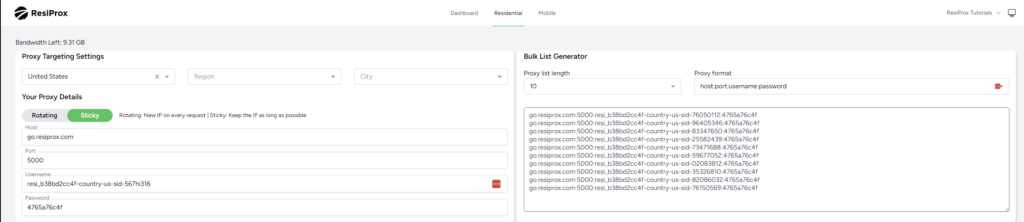
  1. In this example we will use a Rotating Residential Proxy with Sticky session from ResiProx
  2. Choose your Proxy Targeting Settings – You can target proxies by Country, Region & City 
Step 2: Open MoreLogin & Create a New Profile

  1. Log in to your MoreLogin account.
  2. Create a New Profile.
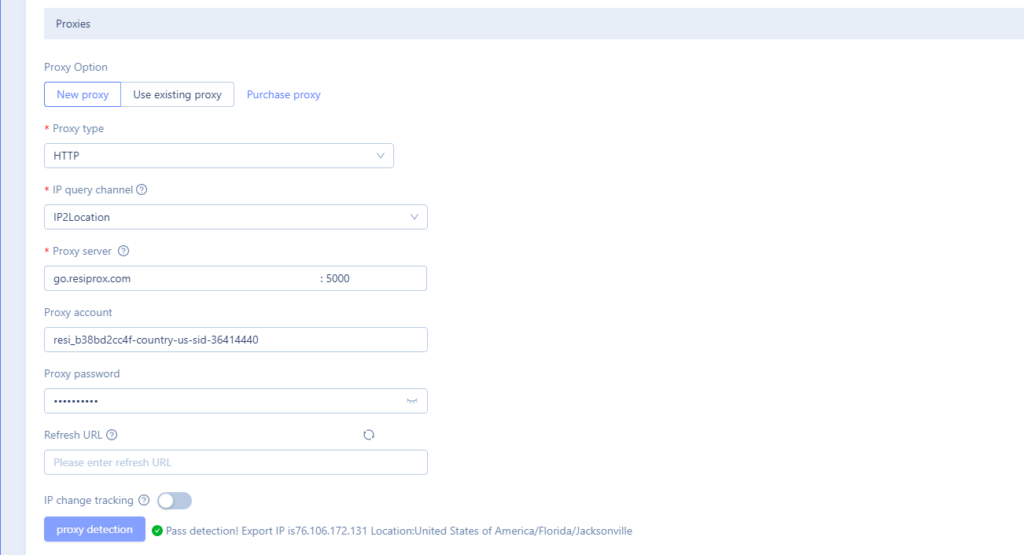
  3. Find the Proxy settings section.

Step 3: Choose Proxy Type

  1. Select the proxy protocol you want to use, HTTP or SOCKS, ResiProx supports both connection protocols.
  2. Enter the proxy server details:
    • Proxy Server Address: go.resiprox.com
    • Port: 5000
    • Username and Password: Enter your proxy details from Step 1

Step 4: Test the Proxy Connection

  1. Click the Check Proxy Button

Step 5: Troubleshooting

If you encounter issues with the proxy integration, consider the following:

  • Check Proxy Details: Ensure the proxy server address, port, and authentication details are correct.
  • Firewall/Antivirus/VPN Settings: Ensure your firewall, VPN or antivirus software isn’t blocking the connection.
  • Proxy Service Status: Verify that your proxy service is active and functioning correctly.

Step 6: Additional Settings (Optional)

  • Sticky Sessions or New IP on every request: Decide if you want to keep the same IP for as long as possible(Sticky Session) or if you want a new IP on every request.
  • Geolocation Settings: Configure the proxy to use specific geolocations if your software or use case requires it.

Conclusion

You have now successfully integrated proxies with Morelogin. This setup allows you to enjoy enhanced privacy, bypass geo-blocks, and optimise your tasks success rate. For additional help, refer to the Morelogin support documentation or contact ResiProx’s customer support team.


4 August 2024

Learn more about Integrations

Best Mobile LTE Proxies

Best Mobile LTE Proxies

The best mobile LTE proxies for work that should look like real phone traffic use real 4G, LTE,...

Best Private Mobile Proxies

Best Private Mobile Proxies

The best private mobile proxies route traffic through real 4G and 5G carrier IPs. Sites see a...

Best UK Mobile Proxies

Best UK Mobile Proxies

The best UK mobile proxies route traffic through real UK carrier IPs on 4G, 5G, and LTE. Teams use...

Best 4G USA Mobile Proxies

Best 4G USA Mobile Proxies

Teams that need real carrier traffic in the United States often search for the best 4G USA mobile...

Best Australia Private Proxy

Best Australia Private Proxy

The best Australia private proxy from real devices helps teams collect public web data, run market...

Best Mobile Proxy Trial

Best Mobile Proxy Trial

Finding a reliable way to test mobile proxies before full commitment helps teams run approved...

Best Mobile Socks5 Proxy

Best Mobile Socks5 Proxy

The best mobile Socks5 proxy delivers real 4G and 5G cellular IPs with full SOCKS5 proxy protocol...

Best Mobile Internet Proxy

Best Mobile Internet Proxy

Finding a solid best mobile internet proxy helps teams collect public web data for approved...

Buy 4G Mobile Proxy Guide

Buy 4G Mobile Proxy Guide

This guide covers everything you need to know about 4G LTE mobile proxies, also called mobile...

Best Mobile Proxy Australia

Best Mobile Proxy Australia

Real 4G, 5G, and LTE carrier IPs let teams view public web experiences across supported locations...

Best ISP proxies in the UK

Best ISP proxies in the UK

Finding the best ISP proxies in the UK can make a real difference when you need stable connections...

Best Tumblr Proxies in 2026

Best Tumblr Proxies in 2026

Tumblr continues to grow as a creative hub, yet managing multiple accounts or handling heavy...

NodeMaven Alternative

NodeMaven Alternative

If you have been searching for a solid NodeMaven alternative, you are likely dealing with...

Live Proxies Alternative

Live Proxies Alternative

If you have been hunting for a solid Live Proxies alternative, you know the frustration that comes...

Best Moj Proxies in 2026

Best Moj Proxies in 2026

Moj continues to grow as a leading short-video platform, and many users look for reliable proxies...

DataImpulse Alternative

DataImpulse Alternative

If you have been hunting for a DataImpulse alternative, you already know how important reliable...

Webshare Alternative

Webshare Alternative

If you are hunting for a Webshare alternative, chances are you want proxies that just work without...

IPRoyal Alternative

IPRoyal Alternative

Many professionals search for an IPRoyal alternative that provides better reliability without...

Oxylabs Alternative

Oxylabs Alternative

Many users hunt for an Oxylabs alternative because they want better performance, simpler setup,...

Best Roblox Proxy in 2026

Best Roblox Proxy in 2026

If you play Roblox regularly, you already know how annoying it feels when restrictions block your...

Best Safari Proxy in 2026

Best Safari Proxy in 2026

Safari users on Mac and iOS often seek better privacy and access options beyond built-in tools. In...