
Chrome Proxy – ResiProx Proxy Integration Guide
- Introduction
- Prerequisites
- Step 1: Choose Your Residential Proxy
- Option 1: Using Proxies in Chrome Without Plugin (Not Recommended)
- Option 2: Proxy SwitchyOmega Plugin For Chrome
- Option 3: Proxy Switcher And Manager
- Option 4: Other Proxy Company’s Plugins
- Why Use Residential Proxies with Google Chrome?
- How to Verify Your Proxy Is Working in Chrome
- Latest News In 2026
- Frequently Asked Questions
- What makes residential proxies suitable for browser-based work compared to other options?
- How often should someone check their proxy connection after setting it up in Chrome?
- Can the same proxy work across multiple Chrome profiles at once?
- Why do some proxy connections feel slower than direct browsing in Chrome?
- What role does the proxy hostname play during Chrome configuration?
- Do Chrome updates in 2026 affect how proxies authenticate?
- Conclusion
Introduction
Welcome to the Google Chrome proxy integration guide. This guide will walk you through the different ways to use proxies with the Google Chrome Browser. We will show you how to use proxies in Chrome without any plugins, as well as the top plugins to use proxies with.
Prerequisites
Before you begin, ensure you have the following:
- Google Chrome installed
- An active ResiProx account (HTTP or SOCKS proxies)
Step 1: Choose Your Residential Proxy
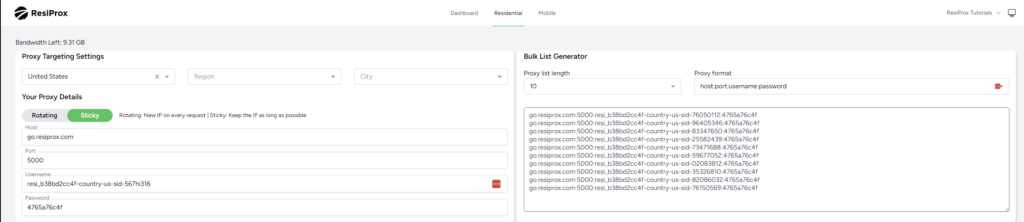
- In this example we will use a Rotating Residential Proxy with Sticky session from ResiProx
- Choose your Proxy Targeting Settings – You can filter proxies by Country, Region & City
Option 1: Using Proxies in Chrome Without Plugin (Not Recommended)
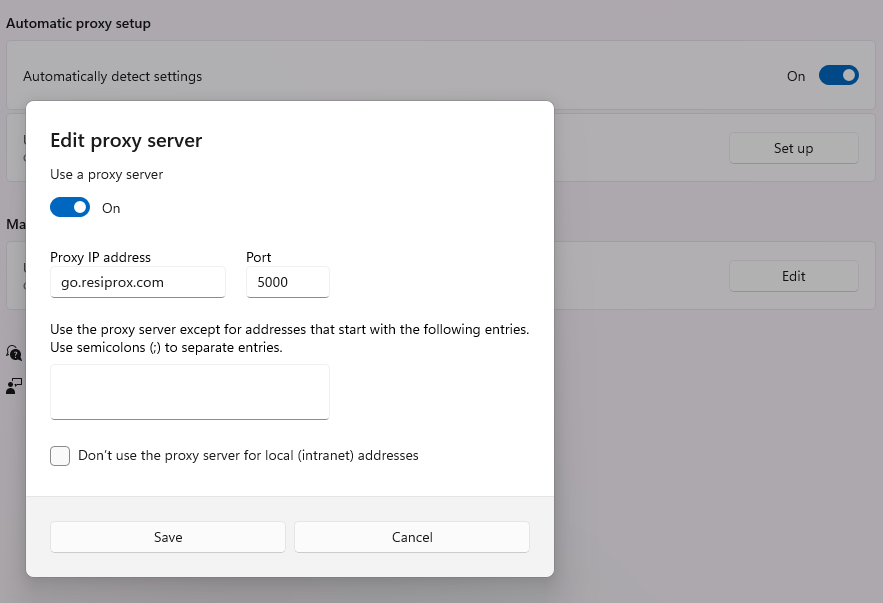
- Copy Paste This In Your Address Bar “chrome://settings/?search=proxy+settings”
- Click on Open Your Computer’s Proxy Settings
- Click on “Use a Proxy Server” & Enter the ResiProx Host & Port from your account
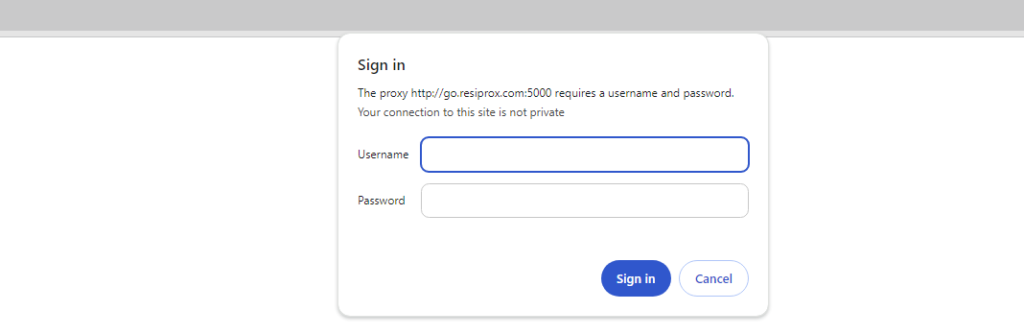
4. After you try to open a website you will see the following window, where you need to enter your proxy username and password that you generated in Step 1
Why is it not recommended to use proxies without a plugin? – When you put your proxy on your computer’s system settings ALL of your internet usage will go through the proxy, instead of just your Google Chrome usage, resulting in a lot more traffic being used due to automatic app updates, syncing and just general usage. It can also cause errors with some other softwares which do not support using proxies.
Option 2: Proxy SwitchyOmega Plugin For Chrome
- Download the Proxy SwitchyOmega Plugin
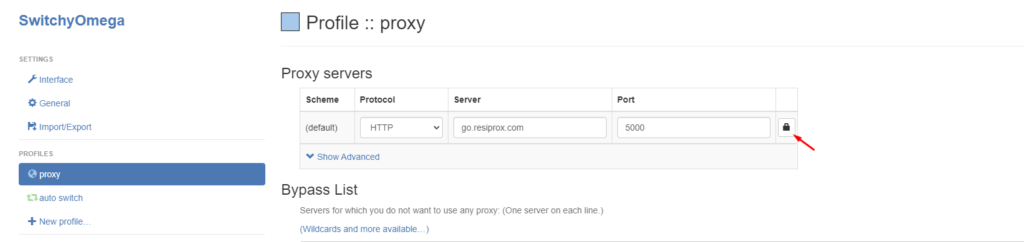
- Upon launching it, you will see that there is already a default proxy profile setup, enter ResiProx’s Host and Port on it, and then click the little Lock Icon in order to be able to write your Proxy Username and Password generated in Step 1
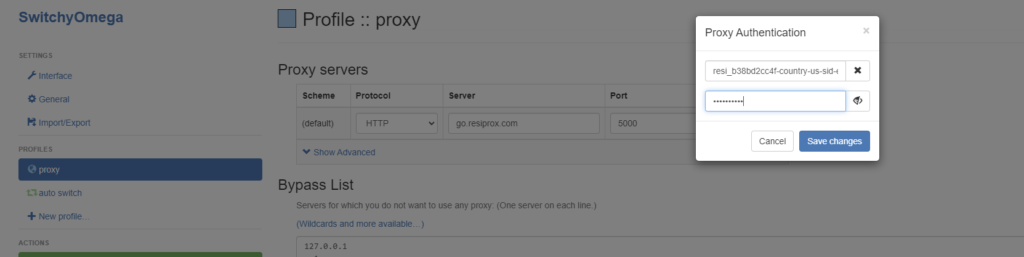
After you have clicked Save Changes, you also need to click on Apply Changes in the Bottom Left Corner
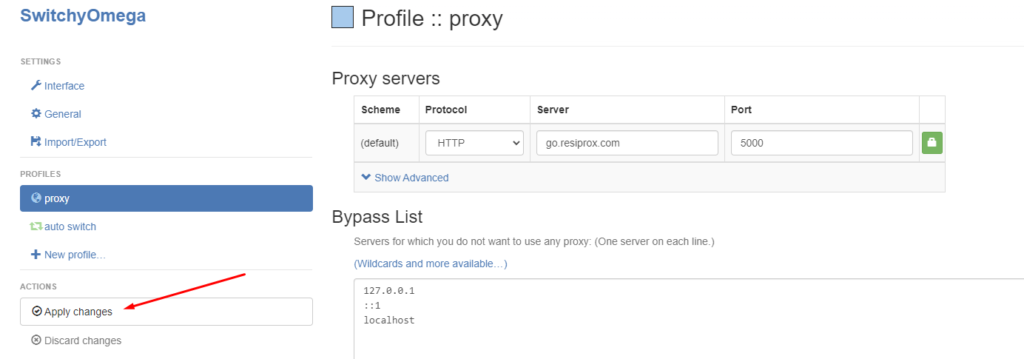
After all of this has been done, click on the Plugin Icon and switch from System Proxy to the “Proxy” profile you have edited just now and your proxy will work.
Keep in mind that due to limitations of Google Chrome & Proxy Manager Plugins for it, you can not use SOCKS5 connection protocol if your proxies require username and password authentication.
Option 3: Proxy Switcher And Manager
- Download the Proxy Switcher and Manager Extension
- Upon Launch you’ll be shown a quite extensive FAQ by their team, but you can also follow the steps below:
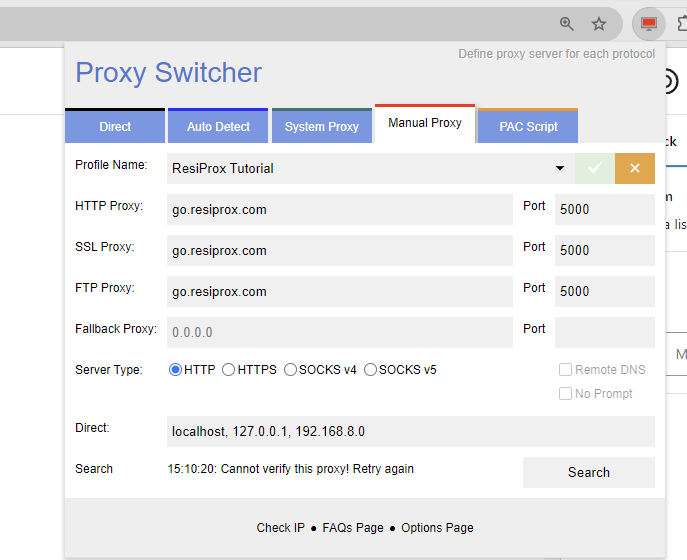
- Pick the Manual Proxy Option and enter ResiProx’s Host and Port
- When you try to open a page you will be shown a screen where you need to enter your proxy username and password, similar to how it would show up if using the proxies directly in Chrome
Option 4: Other Proxy Company’s Plugins
You can also consider using one of the plugins released by other proxy companies, they work quite well with proxies from any provider:
Keep in mind that you can not use SOCKS5 connection protocol on Chrome either with or without plugins if your proxies require user and password authentication.
Why Use Residential Proxies with Google Chrome?
Many professionals turn to residential proxies when they work with browser sessions that need to reflect real home connections from specific areas. These proxies help present traffic in ways that align with ordinary user patterns during extended activities.
Residential proxies stand out because they draw from actual ISP networks rather than shared server environments. This quality supports tasks that benefit from stable presentation over longer periods. When consistency matters more than frequent changes, the residential approach often delivers better results for location-based testing with residential IPs.
Some users combine this setup with mobile proxies in situations that require simulating device-specific network conditions. Mobile proxies add another layer of variety for workflows involving app testing or mobile web experiences. The choice between types depends on whether the task needs fixed residential addresses or carrier-based connections that rotate more naturally.
In practice, residential proxies work well for ad verification and price monitoring projects. They also suit market research that requires viewing public web content from different regions without drawing attention to the connection source. The same applies to separate QA and monitoring workflows, where each session should maintain its own clear identity.
Longer browser sessions sometimes reveal small differences in how proxies handle authentication and data flow. Residential proxies tend to maintain smoother performance in these cases because their origin points match everyday consumer traffic more closely. This alignment reduces friction during research or testing that spans multiple sites or pages.
How to Verify Your Proxy Is Working in Chrome
Verification starts with a simple check that confirms the assigned address matches expectations. Open a new tab and visit a basic IP display page. The shown location and network details should reflect the proxy settings rather than the local connection.
A second step involves testing for leaks. Sites that check DNS or WebRTC information can reveal whether other data escapes the proxy tunnel. Consistent results across a few different test pages give a clearer picture of the overall proxy setup.
Key items to review during verification include:
- The country, region, or city that appears on the results page
- Whether the connection type matches the chosen protocol
- Any signs that the real local address still shows in background checks
Rotating residential proxies may return a new address on each test if the session has refreshed. Sticky sessions should hold the same details for the duration of the active period. Comparing results from two or three checks helps confirm which mode is active.
Mobile proxies follow the same verification process. The main difference appears in the network type listed on some advanced test tools. Both residential proxies and mobile proxies should show clean results when the configuration is correct.
If results vary between tests, small timing differences in how Chrome processes the connection can explain the change. Repeating the check after a short pause often clarifies whether the proxy is functioning as intended.
Latest News In 2026
Browser updates throughout 2026 have refined how Chrome manages proxy authentication and extension behavior. These changes have made some older extension methods less reliable for users who need stable, long-running sessions. At the same time, improvements in how browsers handle secure connections have created new opportunities for residential proxies that support modern authentication flows.
Providers have adjusted their offerings to match these shifts. Better support for consistent sessions now appears in many residential proxy infrastructures. This development has proven useful for professionals who run market research or ad verification tasks that span several hours without interruption.
Interest in location-based testing with residential IPs has grown as more teams need accurate regional data for public web experiences. The same trend shows up in price monitoring and separate research workflows that depend on clean, location-specific results. Mobile proxies have also seen increased attention in testing environments where device network simulation adds value.
Overall, 2026 has brought steadier compatibility between current browser versions and well-configured residential proxy setups. The focus has moved toward reliability during extended use rather than rapid changes.
Frequently Asked Questions
What makes residential proxies suitable for browser-based work compared to other options?
Residential proxies connect through real home networks, which helps them maintain better compatibility with how modern browsers like Chrome handle cookies, storage, and session data over time. This type of infrastructure often supports more consistent behavior during activities that involve multiple page interactions or form submissions. In contrast, other proxy categories may introduce patterns that browsers flag more readily in certain configurations. Many proxy integrations benefit from pairing residential proxies with precise location targeting options available through dedicated services.
How often should someone check their proxy connection after setting it up in Chrome?
Regular checks help catch shifts caused by network changes or session expiration on the provider side. Over longer periods, factors like local internet stability or browser cache buildup can influence how reliably the proxy continues to route traffic. Testing at different times of day sometimes reveals variations tied to overall network load. Tools that display current connection details, such as those found on IP lookup resources, make these ongoing assessments straightforward.
Can the same proxy work across multiple Chrome profiles at once?
Chrome profiles operate as separate environments with their own cached data and settings. A single proxy configuration can apply to one profile while another runs independently or uses different details. This separation allows different activities to proceed without sharing the same connection state. It becomes particularly relevant when managing several distinct research or testing environments at the same time.
Why do some proxy connections feel slower than direct browsing in Chrome?
Every proxy adds an extra routing step between the browser and the destination server. The physical distance to the proxy server and the encryption layers involved in secure connections contribute to this added time. Residential proxies sometimes show different latency profiles because they travel through consumer-grade networks rather than optimized backbone routes. Understanding these factors helps set realistic expectations for page load speeds during extended use.
What role does the proxy hostname play during Chrome configuration?
The hostname serves as the primary identifier that Chrome uses to locate and connect with the proxy server infrastructure. Accurate hostname entry ensures traffic reaches the correct gateway before any authentication or routing rules apply. Some providers offer dynamic hostname systems that adjust based on selected parameters like country or session type. Proper handling of this element reduces connection failures that stem from basic addressing issues.
Do Chrome updates in 2026 affect how proxies authenticate?
Browser updates frequently modify internal security protocols and extension handling mechanisms. These modifications can change how authentication credentials are passed or stored during proxy sessions. Staying aware of compatibility adjustments helps maintain smooth operation after new releases roll out. Residential proxy services generally adapt their endpoints to align with evolving browser standards over time.
Conclusion
We’ve shown you all the different ways to use proxies in the Google Chrome Browser. However for best results it is recommended to use an anti-detect browser instead, because they handle proxies & fingerprint protection much better than a simple Chrome plugin. You can also use SOCKS5 with user&password authentication proxies with anti-detect browsers.